In today’s fast-evolving digital landscape, businesses are increasingly adopting Enterprise Software-as-a-Service (SaaS) solutions to streamline operations, improve scalability, and reduce infrastructure costs. However, one of the biggest challenges organizations face is integrating these modern cloud-based applications with their existing business systems.
Whether your company relies on legacy software, on-premise databases, or a mix of platforms, seamless integration is critical to unlocking the full potential of Enterprise SaaS. Without proper integration, businesses risk data silos, inefficiencies, and operational bottlenecks.
This comprehensive guide will walk you through everything you need to know about integrating Enterprise SaaS with existing systems—from planning and strategy to tools, best practices, and real-world challenges.
What Is Enterprise SaaS Integration?
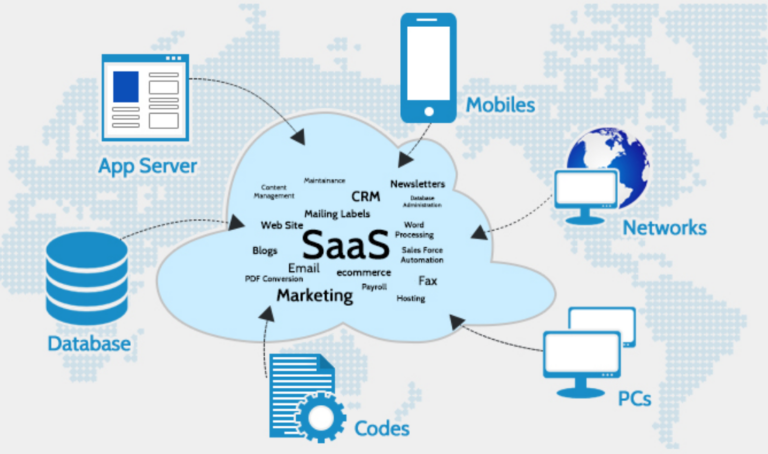
Enterprise SaaS integration refers to the process of connecting cloud-based applications with existing systems, databases, and workflows within an organization. The goal is to enable smooth data exchange and unified operations across platforms.
For example, integrating a SaaS CRM with your accounting system allows customer data and financial records to sync automatically, reducing manual work and errors.
Why Integration Matters
1. Eliminates Data Silos
Without integration, different departments may use separate systems that don’t communicate with each other. Integration ensures data flows freely across platforms.
2. Improves Efficiency
Automation reduces repetitive tasks such as manual data entry, saving time and minimizing human error.
3. Enhances Decision-Making
When systems are connected, businesses gain access to real-time, unified data for better insights and faster decisions.
4. Increases ROI
Maximizing the value of SaaS investments requires seamless integration with existing tools and workflows.
Common Challenges in SaaS Integration
Legacy Systems Compatibility
Older systems may not support modern APIs, making integration complex and time-consuming.
Data Inconsistency
Different systems may store data in varying formats, leading to mismatches and synchronization issues.
Security Concerns
Integrating multiple systems increases the attack surface, requiring robust security measures.
Scalability Issues
Poorly designed integrations can struggle as business needs grow.
Lack of Expertise
Integration often requires specialized technical knowledge that organizations may not have in-house.
Types of SaaS Integration
1. Point-to-Point Integration
Direct connection between two systems. Simple but not scalable for large enterprises.
2. Middleware Integration
Uses an intermediary platform to connect multiple systems, improving scalability and manageability.
3. API-Based Integration
Leverages APIs (Application Programming Interfaces) to enable communication between systems.
4. Data Integration
Focuses on synchronizing data across systems, often using ETL (Extract, Transform, Load) processes.
Step-by-Step Guide to Integrating Enterprise SaaS
Step 1: Assess Your Current Systems
Start by evaluating your existing infrastructure:
- What systems are currently in use?
- How do they communicate?
- What are the limitations?
Create a system map to understand dependencies and data flows.
Step 2: Define Integration Goals
Clearly outline what you want to achieve:
- Real-time data synchronization
- Workflow automation
- Improved reporting
Having defined goals ensures your integration strategy aligns with business objectives.
Step 3: Choose the Right Integration Approach
Depending on your needs, choose an approach:
- Small businesses: API or point-to-point
- Enterprises: Middleware or iPaaS (Integration Platform as a Service)
Step 4: Select Integration Tools
Popular integration tools include:
- iPaaS platforms
- API management tools
- Custom-built solutions
Choose tools based on scalability, ease of use, and compatibility with your systems.
Step 5: Design Data Flow
Plan how data will move between systems:
- What data needs to be shared?
- How often should it sync?
- What format should it use?
Ensure data consistency and avoid duplication.
Step 6: Implement Security Measures
Security should be a top priority:
- Use encryption for data in transit and at rest
- Implement authentication and authorization protocols
- Monitor system access and logs
Step 7: Develop and Test Integration
Before full deployment:
- Test integrations in a staging environment
- Validate data accuracy
- Identify and fix bugs
Step 8: Deploy and Monitor
Once tested:
- Deploy integration to production
- Continuously monitor performance
- Set up alerts for failures
Best Practices for Successful SaaS Integration
1. Start Small and Scale
Begin with critical integrations and expand gradually.
2. Use Standardized APIs
Standard APIs simplify integration and reduce maintenance.
3. Ensure Data Quality
Clean and standardize data before integration.
4. Document Everything
Maintain detailed documentation for future updates and troubleshooting.
5. Prioritize Security
Adopt best practices like OAuth, encryption, and regular audits.
6. Involve Stakeholders
Ensure alignment between IT teams and business units.
Integration Tools and Technologies
iPaaS (Integration Platform as a Service)
Cloud-based platforms that simplify integration with pre-built connectors.
API Gateways
Manage and secure APIs, ensuring smooth communication between systems.
ETL Tools
Used for data extraction, transformation, and loading across systems.
Webhooks
Enable real-time data updates by triggering events between systems.
Real-World Use Cases
CRM and ERP Integration
Sync customer data with financial systems to streamline billing and reporting.
Marketing Automation Integration
Connect marketing tools with CRM systems to track leads and conversions.
HR Systems Integration
Integrate payroll, recruitment, and employee management systems.
E-commerce Integration
Connect online stores with inventory and logistics systems for seamless operations.
Security Considerations
Security is critical in SaaS integration:
- Implement role-based access control (RBAC)
- Use secure APIs
- Conduct regular vulnerability assessments
- Monitor for suspicious activity
Compliance with regulations such as GDPR or HIPAA may also be required depending on your industry.
Measuring Integration Success
Track key performance indicators (KPIs):
- Data accuracy
- System uptime
- Integration latency
- User productivity improvements
Regular evaluation helps optimize integration performance.
Future Trends in SaaS Integration
AI-Powered Integration
Artificial intelligence is being used to automate data mapping and error detection.
Low-Code/No-Code Platforms
Enable non-technical users to build integrations بسهولة.
Event-Driven Architecture
Real-time integrations triggered by events rather than scheduled updates.
Microservices Integration
Modern applications are increasingly built using microservices for better flexibility.
Common Mistakes to Avoid
- Skipping planning مراحل
- Ignoring data quality issues
- Overcomplicating integrations
- Neglecting security
- عدم اختبار النظام بشكل كافٍ
Avoiding these pitfalls can save time, money, and resources.
Conclusion
Integrating Enterprise SaaS with existing business systems is no longer optional—it’s essential for staying competitive in a digital-first world. While the process can be complex, a well-planned strategy, the right tools, and adherence to best practices can ensure success.
By focusing on scalability, security, and data consistency, organizations can create a unified ecosystem that enhances productivity, improves decision-making, and drives growth.
As technology continues to evolve, businesses that invest in robust integration strategies will be better positioned to adapt, innovate, and thrive in the future.
Final Thoughts
Enterprise SaaS integration is a journey, not a one-time project. Continuous monitoring, optimization, and adaptation are key to maintaining a seamless and efficient system.